Warp Matrix demo — a row × column input field for Filament: stock by size and color, prices, permissions. Change anything; the data is reset every hour. warpui.com About Warp Matrix Docs Ask a question Support
Skip to content

Dashboard

Stock by size and color, in one field.From this code.

Filament has no row × column field. Warp Matrix gives you a grid where each row meets each column once, with totals that follow what you type.

Your code One form field
Matrix::make('stock')    ->rows(Size::class, label: 'name')    ->columns(Color::class, label: 'name')    ->relationship(        'stocks',        row: 'size_id',        column: 'color_id',        value: 'quantity',    )    ->numeric(min: 0)    ->totals()
  • ✓Type like a spreadsheet, or paste a range from Excel
  • ✓Rows and columns come from your own models
  • ✓Each filled cell is one row of your stocks table
What you get
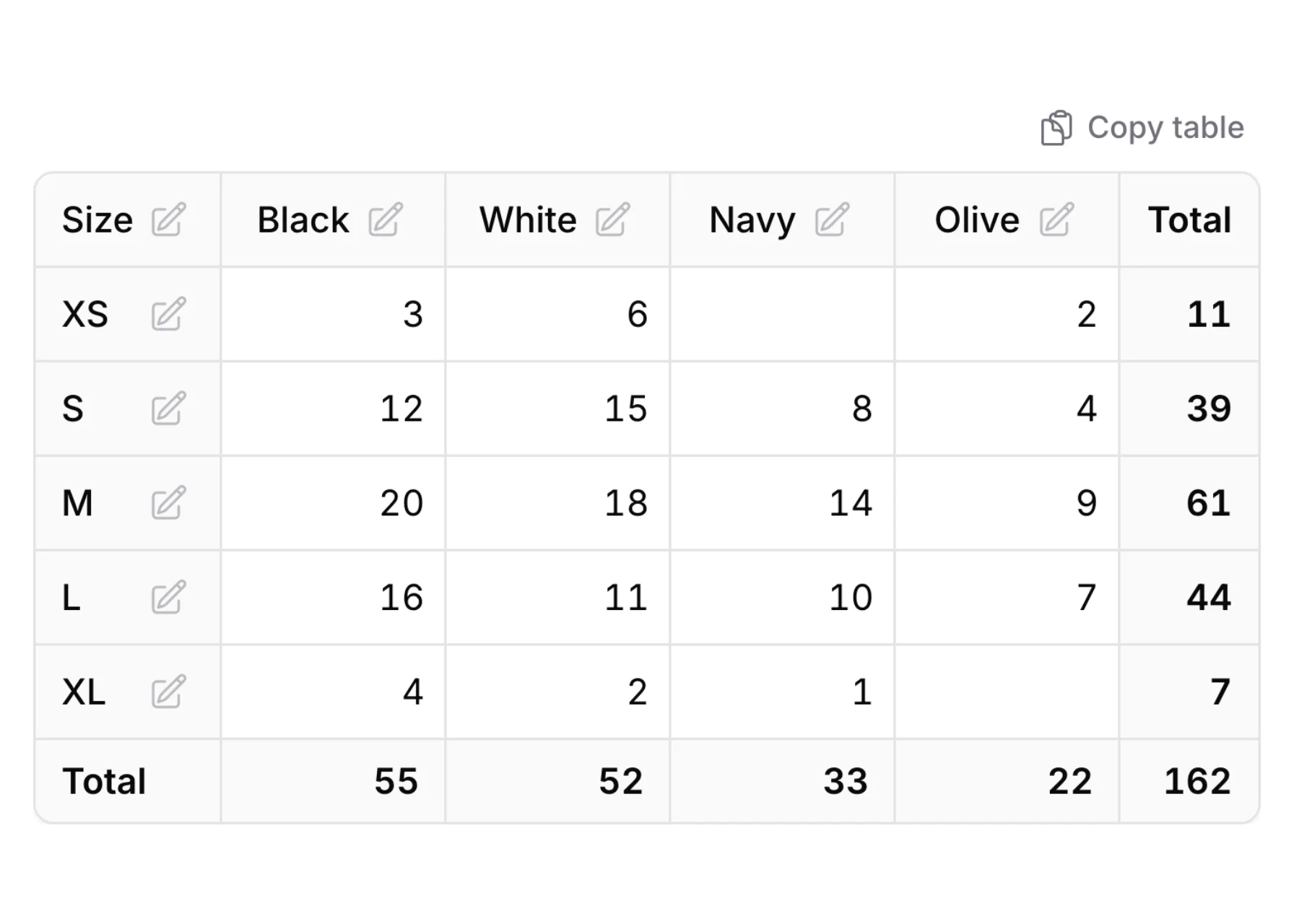
A table of shirt stock with sizes in rows, colors in columns and totals on the right and at the bottom A table of shirt stock with sizes in rows, colors in columns and totals on the right and at the bottom

The picture is this demo's "Stock by size and color" page, which adds a hint, a Copy table button and a product form around the field.

Welcome to the Warp Matrix demo

Maple Thread is a small clothing store. You are Riley Park, the owner. Each page shows one use of the row × column field. Try them in any order.

  1. 1
    Stock by size and color

    Change a few counts of the Oxford shirt and save. The totals follow as you type, and the counts are still there when you open the page again.

    Open the stock →
  2. 2
    Price tiers

    Prices with cents and a $ sign, columns in groups, and the average price under each column.

    Open the price tiers →
  3. 3
    Roles and permissions

    Check what each role may do, or click a role to check its whole row. The Owner row cannot be changed.

    Open the permissions →
  4. 4
    Opening hours

    Choose Open, Closed or By appointment for each day and time of day, and pick one person to open the store each day.

    Open the opening hours →
  5. 5
    Paste from Excel

    Paste a block of numbers into the table at once, move with the arrow keys, fill a whole row with one value, and copy the table back out.

    Open the paste page →
  6. 6
    Cell rules and validation

    Sizes that are not made in a color, a row that cannot be changed, and the messages for a number that is too big or a cell left empty.

    Open the checks →
  7. 7
    Inside a modal and a repeater

    Edit the stock in a modal, and give each item of a list its own price table.

    Open the modal example →
  8. 8
    Read-only view

    The stock shown only to read: low counts in red, a heatmap, and totals.

    Open the read-only view →