A plugin for Filament 5
Shift rosters as fast as a spreadsheet — that know the rules
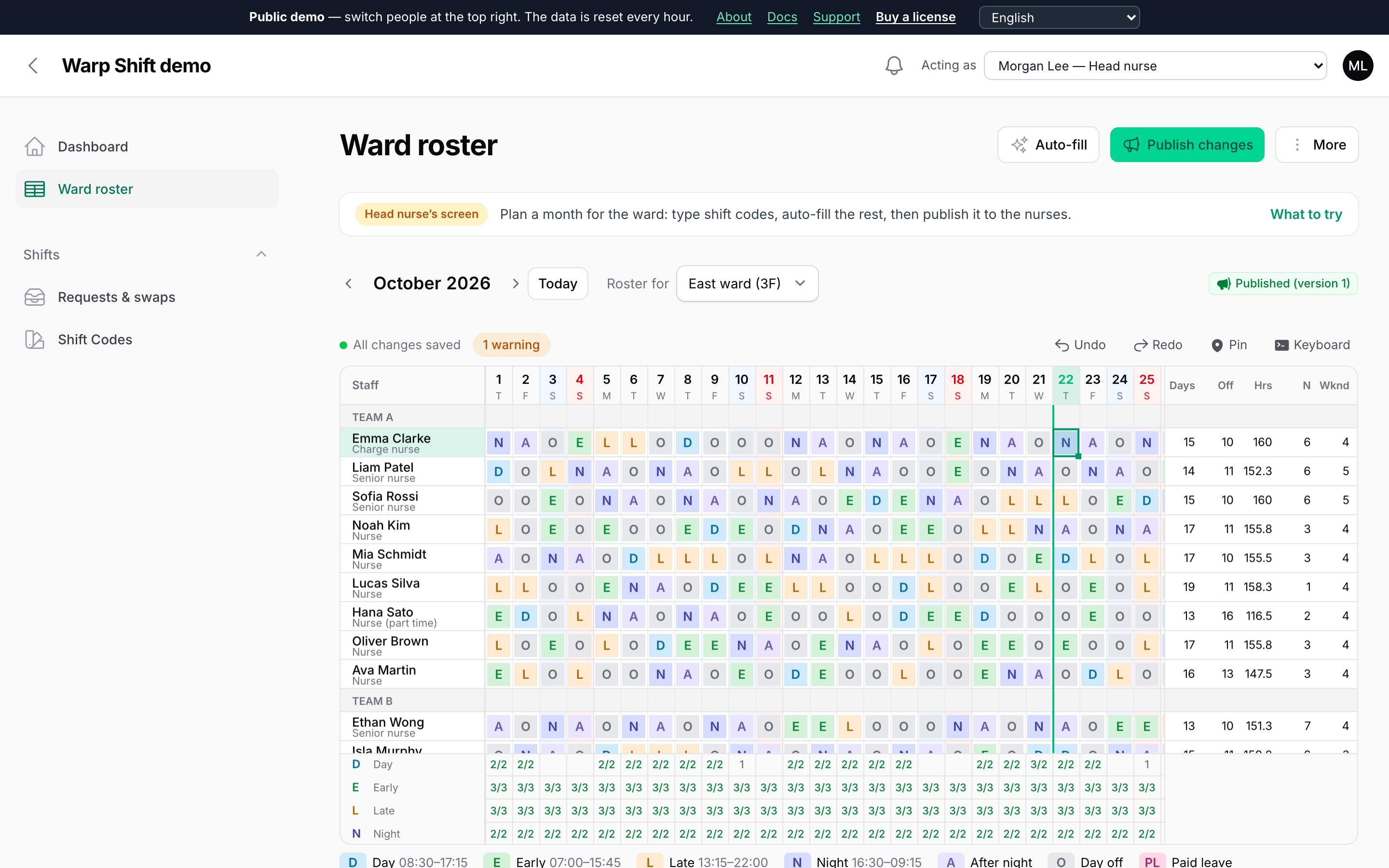
Type a month of early, late and night shifts with the keyboard. Warp Shift shows which days are short and who works too many days in a row while you type, auto-fills the rest, and runs the loop around the roster: day-off requests, publishing, swaps and cover — inside your Filament app.
Keep the spreadsheet speed, add the answers
- Speed
- Type like Excel
- Answers
- Problems as you type
- Loop
- Requests to calendar
Click a cell and type E, L, N. Copy and paste with Excel, drag the corner to repeat a rotation, undo anything. The roster is drawn on a canvas, so a whole ward stays fast.
Staffed / needed under every day, red when short. Cells that break a rule get a red or amber corner: six days in a row, no senior on nights, too few days off.
Staff send day-off requests, see the published roster on their phone, swap shifts or ask for cover, and subscribe in their calendar. Managers approve with one click.
Watch it work
Short clips recorded in this demo. Each one links to the page it was recorded on, so you can try it yourself.
Type shifts like a spreadsheet
Type E, L and N into an empty month. Shortages under each day and rule breaks, such as six days in a row, turn red as you type, with the reason.
Try it in the demo →Auto-fill, then compare drafts
Ask for three drafts, compare rule breaks, requests kept, fairness and cost, and pick one. Right-click a shift to see why that person is on it.
Try it in the demo →Staff ask for cover, you approve
A nurse asks for cover in My shifts, a colleague who is off takes it, and the head nurse approves. The roster changes for both.
Try it in the demo →Hourly shifts for shops and cafés
Type 10-15, or a split shift like 10-14,17-21. Hours someone cannot work turn red; drag a bar in the day view and the labour cost follows.
Try it in the demo →Sites on a shift
Four sites with only two shift codes: put a site on a shift with Shift + F3 and see at once which site is short.
Try it in the demo →Clock-ins next to the plan
The plan and the clock-in in one cell: late arrivals, missing clock-ins and work on a day off are coloured, with the reason.
Try it in the demo →Auto-fill gives you a draft you can use
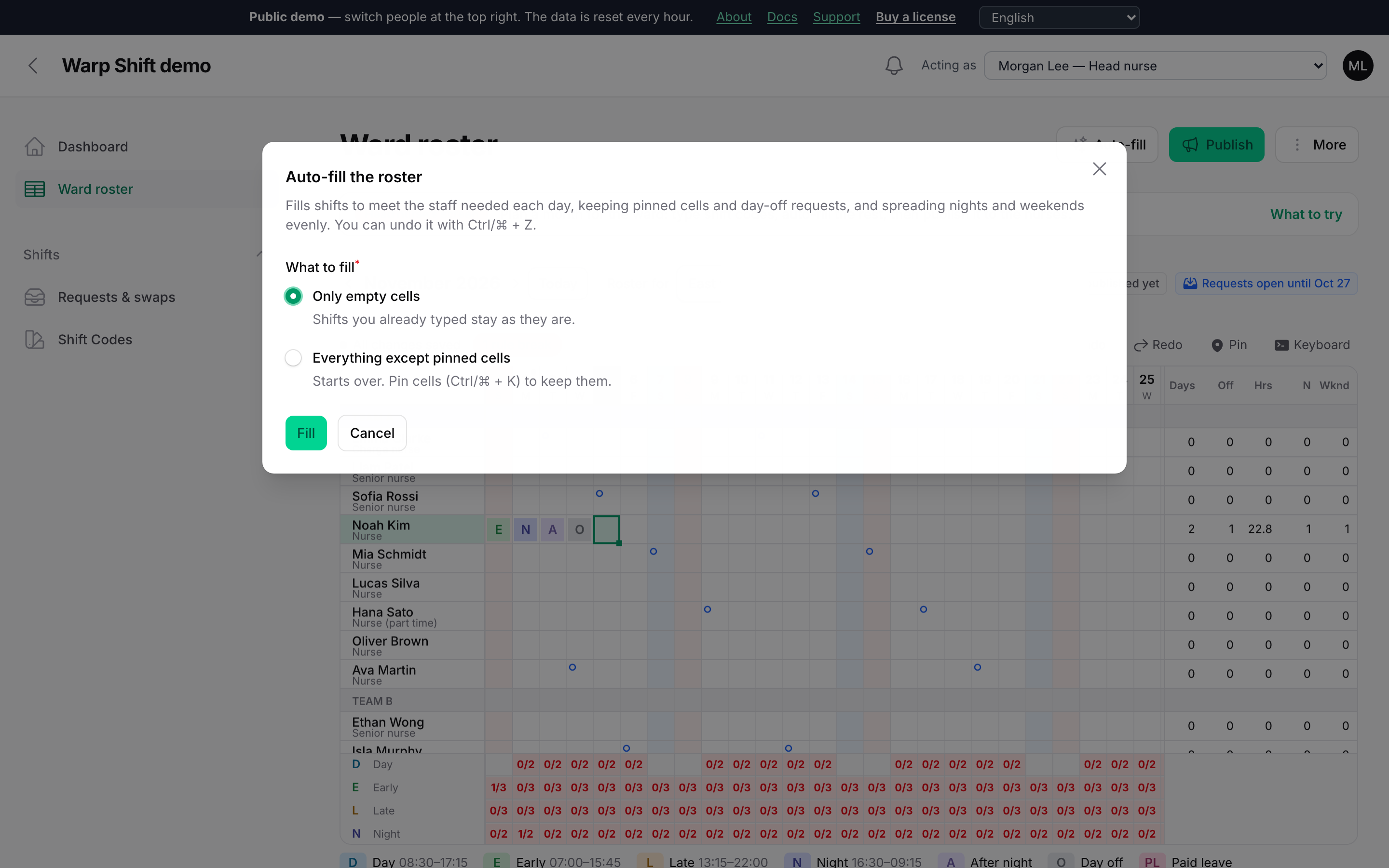
Press Auto-fill and the empty days are planned for you — then change what you like by hand.
- Keeps what matters: pinned cells and every day-off request stay as they are.
- Follows your rules: it never breaks a rule you marked as an error, and avoids warnings such as contract hours.
- Fair: nights and weekends are spread evenly, and it tells you which days are still short.
Rules in a few lines of PHP
The rows are your own models. Each rule is an error or a warning, for everyone or some staff, with values per person. The browser and the server check them the same way.
class WardRoster extends ShiftRoster
{
    public static function roster(Roster $roster): Roster
    {
        return $roster
            ->staff(Nurse::class)
            ->scopes(fn () => Ward::pluck('name', 'id')->all())
            ->rules([
                MaxConsecutiveDays::make(5),
                AfterShift::make('N')->then(['A', 'O']),
                MinDaysOff::make(9),
                RequiredSkill::make('leader')->on(['N'])->atLeast(1),
            ]);
    }
}
For the staff, on their phone
In the demo, switch to any nurse at the top right to see their side.
My shifts
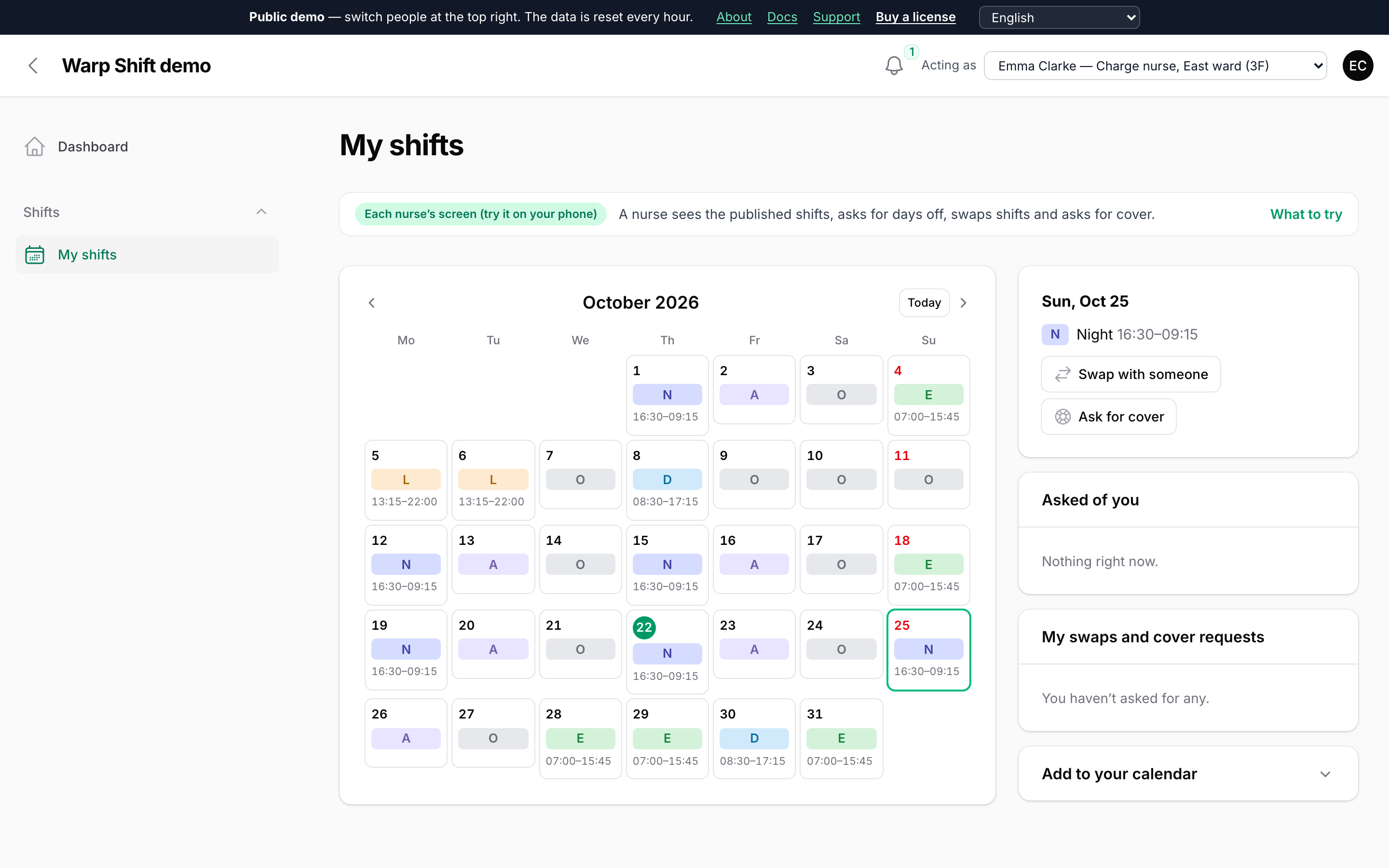
A month calendar of the published shifts with times. Tap a day to ask for a day off, a swap or cover. Subscribe in Google, Apple or Outlook calendar.
Swaps and cover, approved in one click
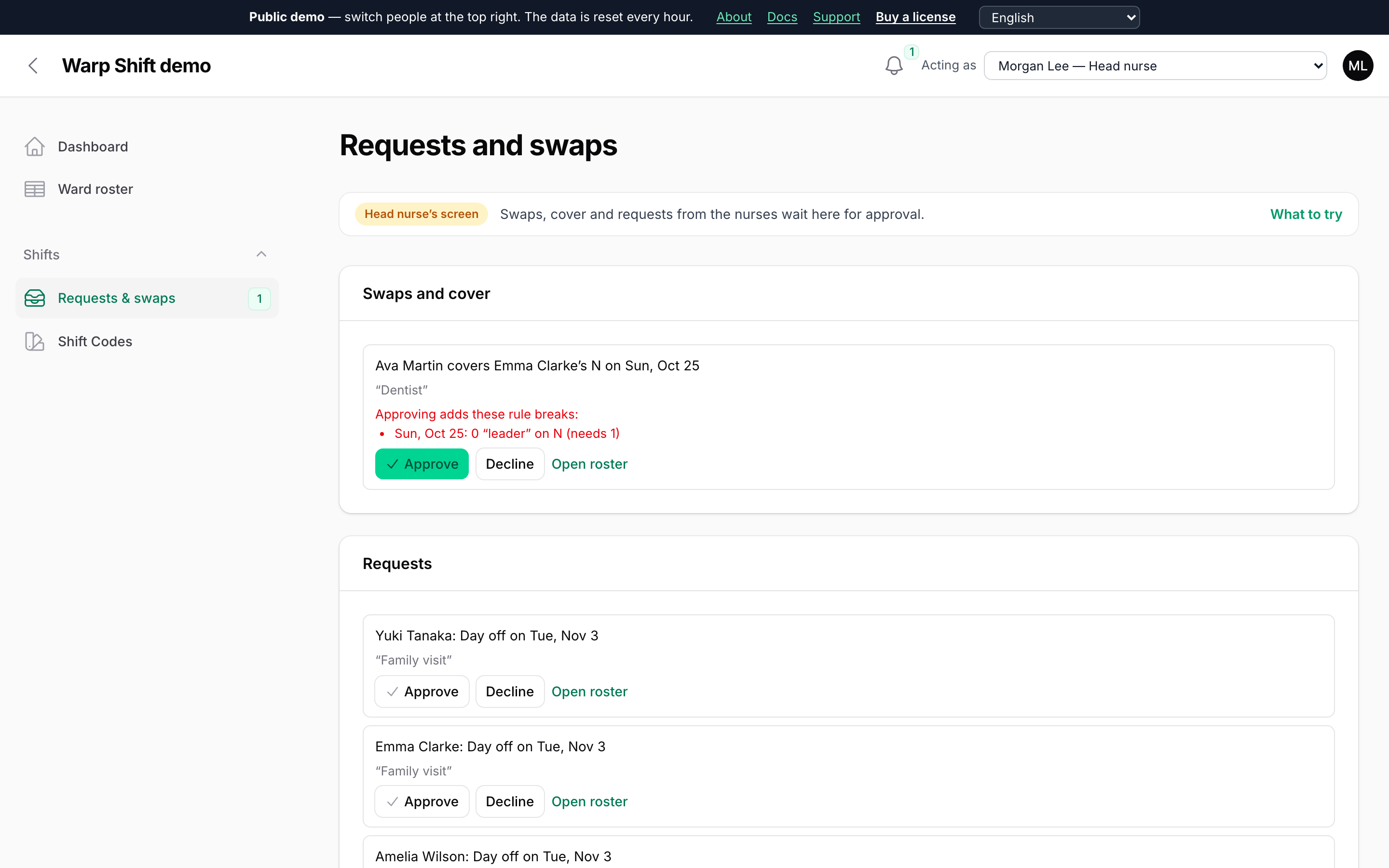
Everyone free that day sees a cover request and can take it. The manager sees beforehand whether approving breaks a rule; a night moves together with its rest day.
Shops by the hour, and the planning around the roster
The demo also has a café with two shops, planned by the hour. Try each of these from the start page of the demo.
Times in a cell
Type 10-15 instead of a code. Staff needed by time of day, and a view of the day by hour where you drag the bars.
Labour cost and budget
Wages, night premiums and shift allowances under every day, the month against its budget, and a payroll summary to download.
Help from another ward
On a short day, borrow someone the other ward or shop can spare, for that day only.
Compare drafts, ask why
Auto-fill three ways side by side, then right-click a shift to see why this person is on it and the others are not.
Fair over the year
Nights and weekends evened out across the months, and whole-team rules such as Japan’s 72-hour night rule.
Import and reminders
Bring in a roster made in Excel, and remind the staff who haven’t sent their requests yet.
Pricing
Install with Composer using your email and license key. Every version released during your update period stays yours.
Single Project
$99
1 year of updates
One project that is not a SaaS, in all of its environments.
Buy Single ProjectUnlimited Projects
$199
1 year of updates
Any number of projects, including SaaS applications.
Buy Unlimited ProjectsNot sure it fits, or which license you need? Ask before you buy: pre-sales questions are welcome.
Notes for Filament builders
Practical Filament tips, news about Warp Shift and the other Warp plugins, and the occasional offer, once or twice a month. Unsubscribe anytime.
Thanks! You're on the list.
From the makers of Warp Shift
Warp UI: fast plugins for Filament with real amounts of data
Warp Shift is one of the Warp plugins. Each one draws the heavy part on a canvas, so thousands of rows stay smooth, while forms, actions and policies stay Filament's own. Same look, same license terms, one place for support.
- Warp Table Fast tables for large pages
- Warp Sheet A spreadsheet for your resources
- Warp Repeater Table repeaters with a thousand lines
- Warp Scheduler A resource scheduler for thousands of rows
- Warp Pivot Pivot tables that add up in the database
- Warp Floor Floor plans for desks, rooms and shelves
- Warp Import Imports you review, fix and undo
- Warp Shift You are here Monthly shift rosters that check the rules
- Warp Markup Findings pinned on PDF drawings and photos

Can Warp Shift do what your app needs? Describe your case and we’ll tell you honestly. An email address is all you need.
Ask us